
Amazonのアソシエイトとして、ラズパイダ(raspida.com)は適格販売により収入を得ています。詳しくは当サイトの プライバシーポリシーをご覧ください。
Raspberry Pi OSが11月8日、Debian同様に「bullseye」へバージョンアップしました。本家Debianが2年振りにバージョンアップ!を果たし、Raspberry Pi OSの対応が長らく待たれていた。(リリース日は2021-10-30付け)
今回はGTK+3の採用などGUIが少しリッチな表現になり、見た目が他のLinuxのOSに近づいた印象です。
気になる人は、早速ダウンロードして試してください。(メジャーアップグレードは推奨されていません)
GTK+3
スクリーンショットのように先ずは見た目が異なることが分かります。
他のLinuxディストリビューションのような見た目に近づいたのは、ウィンドウマネージャーにGTK+3が採用されたからです。これまではGTK+2でした。
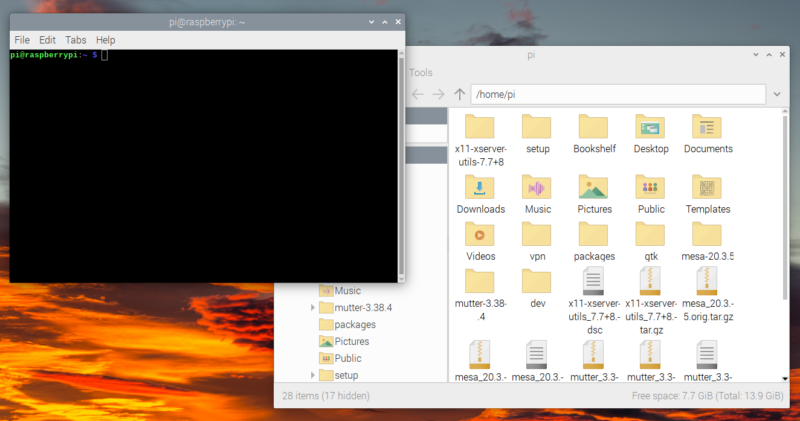
引用:Bullseye – the new version of Raspberry Pi OS
今回も主にRaspberry Piというハードに合わせたバージョンアップに仕上がっています。
リリースノートをみてみます。
Raspberry Pi OS bullseyeのリリースノート
2021-10-30:
  * Based on Debian version 11 (bullseye)
  * Desktop components (lxpanel and all plugins, libfm, pcmanfm) now built against GTK+3
  * Applications (piwiz, pipanel, rc_gui, lxinput) now built against GTK+3
  * PiXflat GTK+3 theme updated with numerous changes to support the above
  * GTK+3 : toolbar icon size setting added
  * GTK+3 : ability to request client-side decoration on windows added
  * GTK+3 : setting for indent for frame labels in custom style added
  * mutter window manager used instead of openbox on devices with 2GB or more of RAM
  * mutter : title bar icon behaviour and appearance modified to match openbox
  * mutter : additional keyboard shortcuts added
  * mutter : various performance enhancements
  * mutter compatibility added to screen magnifier
  * Numerous changes to Appearance Settings application to support GTK+3 and mutter
  * Updater plugin added to lxpanel to detect and install software updates
  * File manager view options simplified to either list or icons, with separate menu option for thumbnails
  * New file manager toolbar icons
  * KMS used as default display driver
  * Modifications to HDMI audio output selection to support the above
  * xcompmgr enabled when openbox is running under KMS
  * New default camera subsystem based on libcamera
  * New camera demo applications (libcamera-still and libcamera-vid) have replaced raspistill and raspivid
  * Legacy camera subsystem removed from 64-bit RPi OS (still available on 32-bit)
  * Chromium upgraded to version 92.0.4515.98
  * VLC media player upgraded to version 3.0.16
  * Spurious drive removal warning after use of SD card copier removed
  * Bookshelf application now includes Custom PC magazine
  * Various translation updates - Italian, Korean, Polish, German, Armenian
  * Startup wizard now installs Japanese fonts if needed
  * Progress and information dialog boxes for lxpanel plugins now common to lxpanel, rather than in individual plugins
  * Icon handling code for lxpanel plugins now common to lxpanel
  * Package with 4K version of Raspberry Pi wallpaper added to Recommended Software
  * Python Games and Minecraft removed from Recommended Software - neither is compatible with bullseye
  * Bluetooth pairing and connection dialogs updated for compatibility with more devices
  * Bluetooth devices always disconnected before removal to speed up removal process
  * Bluetooth pairing dialog now only shows devices which offer services which are usable by Pi
  * Separate Bluetooth unpair dialog removed - unpair now an option for each individual device
  * Bug fix - mutter : header bar colours not updating when theme is changed
  * Bug fix - GTK+3 : tooltips being displayed incorrectly at bottom of screen
  * Bug fix - lxpanel : crash when using keyboard shortcut to enable magnifier when magnifier not installed
  * Bug fix - lxpanel : lockup in Bluetooth plugin when connecting to certain devices
  * Bug fix - lxpanel : discoverable mode icon could get out of sync with underlying Bluetooth system state
  * Bug fix - piwiz : missing cities in timezone list
  * Bug fix - piwiz : country-specific language packages not being installed
  * Bug fix - bookshelf : now waits for longer between packets before timing out
  * Bug fix - accented characters now displayed correctly in localisation dialogs
  * Raspberry Pi firmware e2bab29767e51c683a312df20014e3277275b8a6
  * Linux kernel 5.10.63
スタートアップウィザードは、必要に応じて日本語フォント+日本語入力環境(fcitxとMozc)をインストールするようになりました。
これでセットアップウィザードで言語をJapaneseにすれば、最初から日本語の環境が手に入るようになります。これは便利ですね。
GTK+3の採用により、ウィンドウマネージャーmutterが使用されています。mutterがウインドウのアニメーションやウィンドウの影などのシェーディングを行います。
全てのウィンドウに対して行うため、メモリーはこれまでよりも多く消費します。
そのため、メモリーが2GB未満のRaspberry Piでは、mutterの代わりに古いオープンボックスウィンドウマネージャーが引き続き使用されます。
Raspberry Pi 4 の4GBがあれば動作に支障はないでしょう。
■Pi 5は8GBモデルがオススメ



ダウンロード
ダウンロードしてmicroSDカードへ書き込むのに、Raspberry Pi OS Imagerを利用してください。
Imagerのアプリケーションはこちら。
イメージファイルとしてダウンロードしたいのなら、こちら。
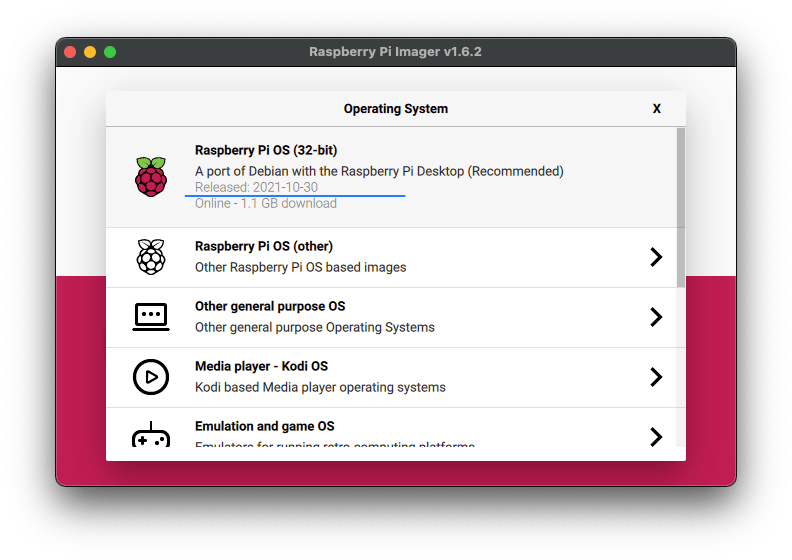
リリース日は2021年10月30日で32bit版のみ
なお、baster → bullseye へはメジャーアップデートのため、通常のアップグレードコマンドではできません。システムが深いところで変更になっているので、新規にインストールすることが推奨されています。
大幅に変更になっているため、アップグレードではどうしても不具合は避けられません。
新たなmicroSDカードを手に入れ差し替えて使用することをラズパイダとしてもオススメします。
標準でメニューから選べるコピーツールを用いて、既存のbasterを丸ごと別のmicroSDカードへコピーしておくと、後から差し替えるだけで元の環境に戻れます。
ファーストインプレッション
細かい点ですけど、日本語にまつわる機能追加はRaspberry Pi 初心者に嬉しい。
これからじっくりと使ってみないと何ともいえませんが、見た目が良くなるのは操作したくなる点で重要です。デザインって大事ですよね。
益々、Raspberry Pi をデスクトップPCライクに使いたくなりました。
Ubuntuや他のLinuxを使ったことがある人には驚きは少なく、非常に細かいアップデートがされた印象です。
64bit版は正式にリリースされていない様子ですから続報に期待したいところです。因みに、64bit版を試したい場合、最新は今回の発表に合わせて11月8日付けバージョンがありました。(ベータ版)
64bit版がリリースされました。
64bit Raspberry Pi OS
アップデートのニュースでした。